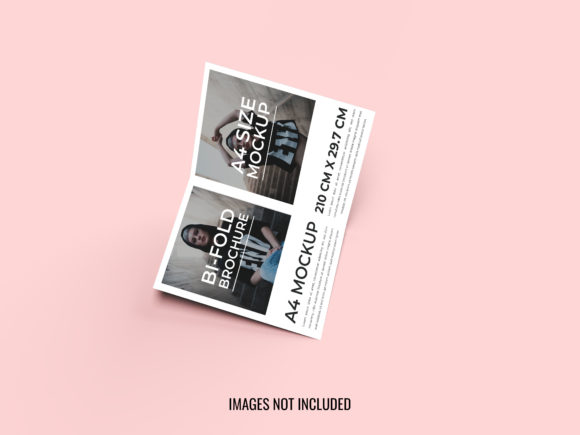
Bi-fold 3d Modern Brochure Design Mockup
Imagine holding a physical brochure that feels real, with shadows falling exactly where light would hit a folded page. This is the power of a Bi-fold 3d Modern Brochure Design Mockup. It transforms a flat digital file into a tangible presentation tool, allowing you to visualize your design before it ever hits the printer. Whether you are a freelancer pitching a new brand identity or a small business owner preparing for a trade show, seeing your work in three dimensions changes how you evaluate quality and impact.
This specific mockup is built on Adobe Photoshop CC, ensuring compatibility with industry-standard tools. With a resolution of 300 DPI and dimensions of 4000×3000 pixels, the output is crisp enough for high-quality printing or large-scale web displays. The RGB color mode keeps colors vibrant for digital previews, while the well-organized layers allow you to adjust lights and shadows effortlessly. These features make it more than just a template; it is a flexible workspace for refining your creative vision.
Why Visualizing Your Design Matters
Designing a brochure on a computer screen often feels abstract. You can see the layout, but you cannot feel the weight of the paper or the way the fold interacts with the content. A bi-fold structure adds complexity because it involves multiple panels and a central crease. Without a realistic preview, text might get lost near the fold, or images might look distorted when the paper bends.
The Bi-fold 3d Modern Brochure Design Mockup solves this by providing a realistic environment. It allows you to spot alignment issues, check contrast levels against shadows, and ensure that the hierarchy of information remains clear even when the brochure is partially open. This step is crucial for professionals who need to present their work to clients who may not be designers themselves. Showing a client a flat JPEG is helpful, but showing them a photorealistic 3D render creates an emotional connection and builds confidence in the final product.
Priorities for Beginners and Hobbyists
For those new to graphic design or hobbyists creating personal projects, the primary concern is usually ease of use and learning value. You do not want to spend hours fighting with complex software settings just to see your idea come to life. This mockup is designed to be easily editable, meaning you simply drag and drop your artwork into the designated smart objects.
- Simplicity: The organized layers mean you won't get lost in a tangled mess of files. Each element, from the background to the lighting effects, has its own space.
- Creative Freedom: Adjusting lights and shadows helps beginners understand how lighting affects perception without needing advanced 3D modeling skills.
- Cost-Effectiveness: Since the images are not included, you only pay for the tool, not pre-made graphics, making it a budget-friendly option for students or DIY enthusiasts.
If you are building a portfolio as a beginner, using a high-quality mockup like this demonstrates attention to detail. It shows that you care about the presentation, not just the creation. Even if your design skills are still developing, presenting your work in a professional 3D context elevates your perceived competence.
Strategic Value for Professionals and Entrepreneurs
Experienced designers and entrepreneurs view this tool through a different lens: efficiency and commercial value. For a marketing team or a freelancer managing multiple clients, time is money. The ability to quickly generate a photorealistic image saves hours of rendering time or manual editing.
When pitching to a potential investor or a corporate client, reliability is key. They need to know that the design will translate perfectly to print. By using a mockup with 300 resolution and precise dimensions, you eliminate the guesswork. You can confidently say, "This is exactly what you will receive," which reduces back-and-forth revisions and speeds up the approval process.
- Speed: Drag, drop, and save. The workflow is streamlined for quick turnarounds.
- Flexibility: The RGB color mode ensures that digital presentations match the vibrancy of the final printed piece, preventing color mismatch surprises.
- Professionalism: A polished presentation implies a polished service. It signals that you have mastered the technical aspects of your craft.
Applications for Educators and Publishers
Educators and publishers often need to demonstrate concepts or showcase educational materials. For a teacher explaining the principles of layout and typography, a 3D mockup serves as an excellent visual aid. It provides a concrete example of how design elements interact in a real-world scenario.
Publishers, whether of books or magazines, use these tools to prototype covers and internal layouts. The bi-fold format is common for catalogs, event programs, and informational booklets. By adjusting the shadows and folds, they can test how much white space is needed around the edges to avoid cutting off important content during the binding process. The long-term usefulness of such a resource lies in its reusability; once set up, it can serve as a standard template for future projects, ensuring consistency across a series of publications.
Matching the Tool to Your Goals
Not every project requires a 3D mockup, but knowing when to use one is part of strategic planning. If you are working on a simple flyer or a single-page social media post, a 3D brochure mockup might be overkill. However, for anything involving a fold, a booklet, or a multi-panel display, the added realism is invaluable.
Consider your specific needs regarding quality and creativity. If your goal is to create a stunning visual for a website banner, the 4000×3000 pixel size provides ample room for cropping and resizing without losing sharpness. If your priority is understanding the mechanics of light and shadow on paper, the adjustable layers offer a sandbox for experimentation.
The decision to use this Bi-fold 3d Modern Brochure Design Mockup ultimately depends on your desire to bridge the gap between digital imagination and physical reality. It empowers you to see your work from the viewer's perspective, ensuring that the message is delivered clearly and effectively. Whether you are a seasoned pro looking to streamline your workflow or a newcomer eager to learn the ropes, this tool offers a practical path to better design outcomes.
By focusing on the practical benefits—such as reduced errors, faster approvals, and enhanced presentation—you can determine if this resource fits your current project. Remember, the best designs are not just created; they are presented in a way that resonates with the audience. This mockup provides the stage for your design to shine, turning a simple PDF into a compelling visual story.